Responsive by default
Any number of breakpoints from 320 to 2560 px. Each screen keeps its own geometry.
SupportedThis site documents the importer’s real contract: from pixel-accurate text to media upload and interaction runtime.
Open the guideEvery card below is a real feature in the current Beta 0.2.3, not a decorative list.
Any number of breakpoints from 320 to 2560 px. Each screen keeps its own geometry.
SupportedFonts, lists, mixed styles, Auto Width and Auto Height map to native Tilda fields.
SupportedUnique images are deduplicated, compressed to WebP and uploaded to Tilda CDN.
SupportedMultiple fills, per-corner radius, shadows, blur, masks and opacity — without rasterizing text.
SupportedDirection, gap, padding, wrap, align and justify. Nested groups stay editable.
SupportedVector elements land in Zero Block as native vectors with their geometry preserved.
SupportedRecognizes button / btn / cta, classes [c-…], links [l-…] and new-tab directives.
SupportedReady-made markers become a working runtime for slider, tabs and accordion after publishing.
SupportedColumns, gutter, offset and alignment travel with the rest of the block fields.
SupportedThe plugin packages styles, deduplicates media, generates SVG, and native Flexbox with zero extra configuration.
SupportedOne package, two editors. The host is detected automatically and the exporter is shared.
SupportedThe layout package stays on your computer; the account service only checks access and records successful import usage.
SupportedSet up the structure once, then copy the package and start the import with a button.
Buttons, cards, text, vectors, Auto Layout groups or full responsive 1200..320 px breakpoints.
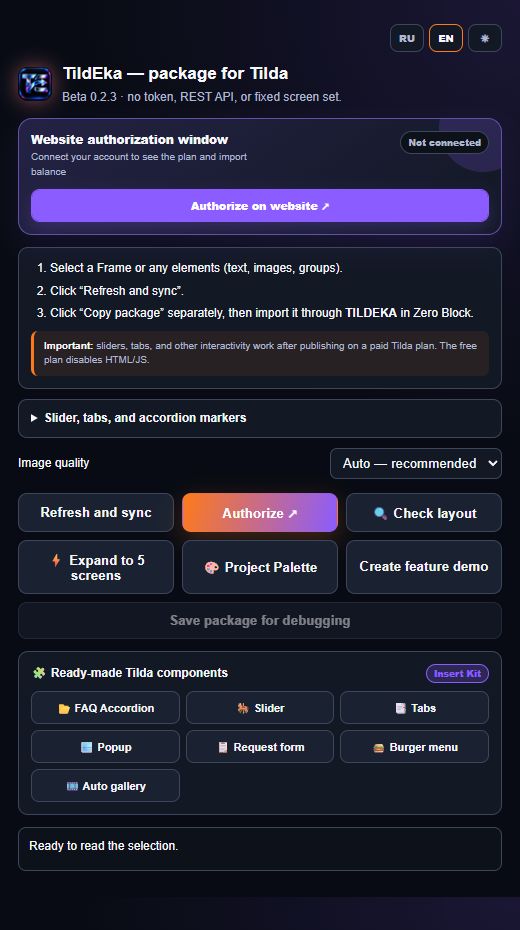
Click “Refresh and sync”, then “Copy package” — the plugin bundles geometry, vectors and styles to the clipboard.
Inside Zero Block editor, click TILDEKA, then “Import package from clipboard”.
TildEka does not restrict you to frames: select individual buttons, text, vector groups, Auto Layout, or multi-screen artboards. The plugin instantly prepares a package preserving styles, geometry, and native Flex.